Your desktop is cards. Your cards are knowledge.
Cards as macOS-style windows — draggable, flippable, pin-able. The Ebbinghaus SM-2 spaced repetition algorithm schedules your review automatically.
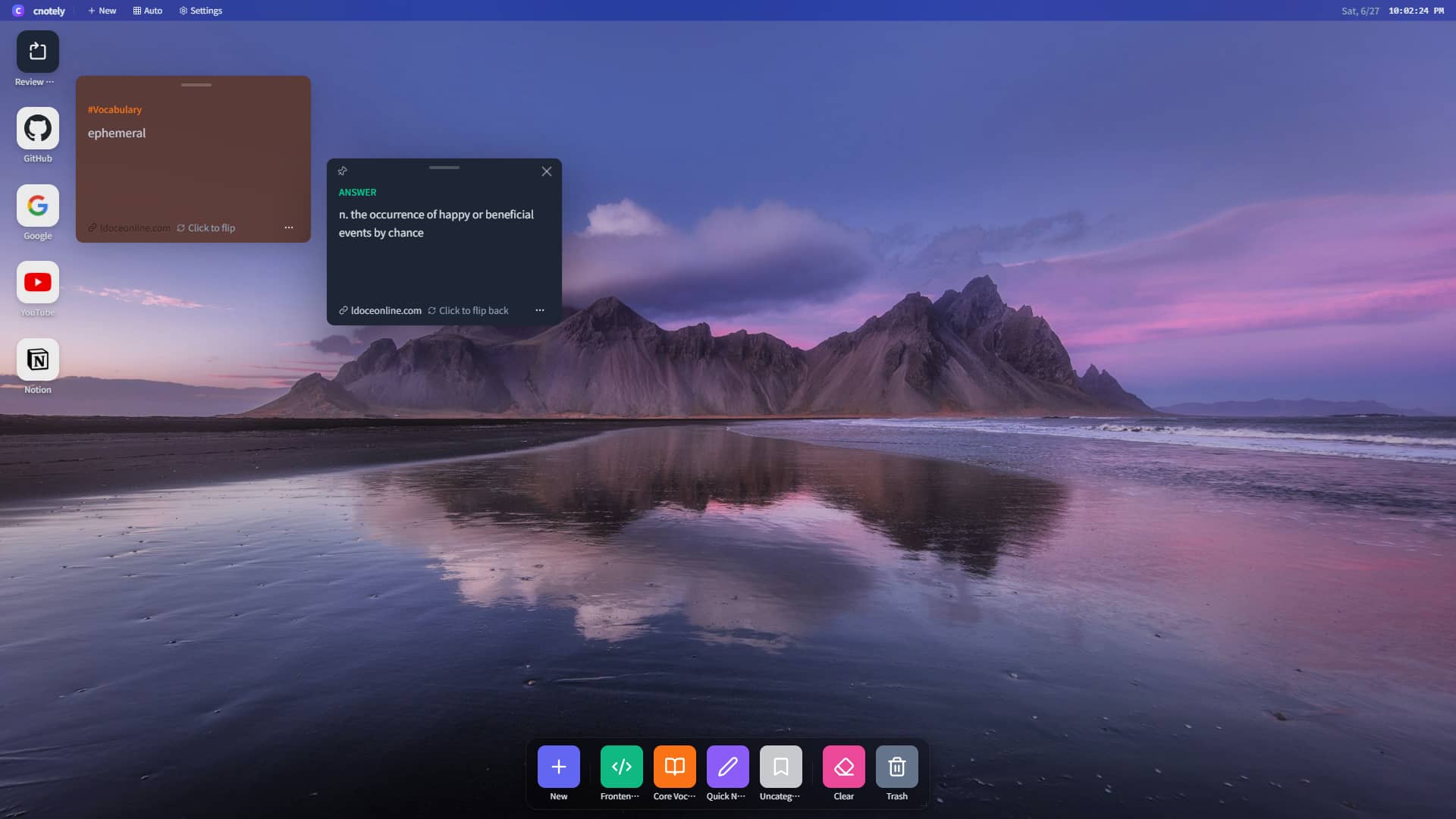
A desktop designed for learning and memory
Select text on any page and auto-generate a two-sided memory card. Select to create — no copy-paste, no switching apps.
Cards exist as windows you can drag, pin and resize — manage your knowledge like in Finder. A new-tab workstation opens today's review tasks every time.
Auto-calculates your next review based on your rating: the better you know it, the longer the interval.
A Pomodoro timer built into the sidebar, flowing seamlessly with your review sessions.
Every category has its own color and icon, visualizing and organizing your knowledge.
Smart scheduling based on the Ebbinghaus forgetting curve
Click "Mastered", and the card's interval gradually lengthens. Click "Forgot", and it resets to a shorter one. The system adjusts based on your feedback so every card appears right before you are about to forget it.
Learn a new card; the system sets the initial review interval to 1 day.
Once mastered, the interval stretches to 6 days; the ease factor holds or adjusts slightly.
Each interval = the last interval × the difficulty factor, steadily building long-term memory.
From web clipping to desktop review.
The Note Platform extracts content from the web; the memory card workstation makes it truly memorable. Used together, they form your complete knowledge system.
Still have questions?
Here are the most common ones. If yours isn’t listed, feel free to open an issue on GitHub.
Q01 Do I really not need an account?
That is correct. Cnotely stores everything in your browser’s IndexedDB. No servers, no sign-in, no upload of any kind.
Do I really not need an account?
That is correct. Cnotely stores everything in your browser’s IndexedDB. No servers, no sign-in, no upload of any kind.
Q02 Can I lose my data?
Since everything lives in your browser, clearing browser data, switching devices, or uninstalling extensions will delete it. We recommend regular exports as backups.
Can I lose my data?
Since everything lives in your browser, clearing browser data, switching devices, or uninstalling extensions will delete it. We recommend regular exports as backups.
Q03 What export formats are supported?
The Note Platform supports PDF / DOCX / HTML / Markdown. EPUB and bundled PDF exports are planned.
What export formats are supported?
The Note Platform supports PDF / DOCX / HTML / Markdown. EPUB and bundled PDF exports are planned.
Q04 What algorithm powers the memory cards?
We use an SM-2 based spaced-repetition algorithm — the same family as Anki. Each card’s interval adjusts dynamically based on your feedback, surfacing right before you’d forget it.
What algorithm powers the memory cards?
We use an SM-2 based spaced-repetition algorithm — the same family as Anki. Each card’s interval adjusts dynamically based on your feedback, surfacing right before you’d forget it.
Q05 Do I have to use both products together?
Not at all. The Note Platform is fully independent; so is creating cards manually. But together, you get the full clip-to-review experience.
Do I have to use both products together?
Not at all. The Note Platform is fully independent; so is creating cards manually. But together, you get the full clip-to-review experience.
Q06 Which browsers are supported?
Chrome, Edge and Firefox all have extensions; the Web App runs in any modern browser.
Which browsers are supported?
Chrome, Edge and Firefox all have extensions; the Web App runs in any modern browser.
Q07 Where is the source code?
The full source lives on GitHub — build it, audit it, fork it. See the repo root for instructions.
Where is the source code?
The full source lives on GitHub — build it, audit it, fork it. See the repo root for instructions.
Make knowledge truly stick.
From the web to memory in just three steps. Open the workstation and start with today's review cards.